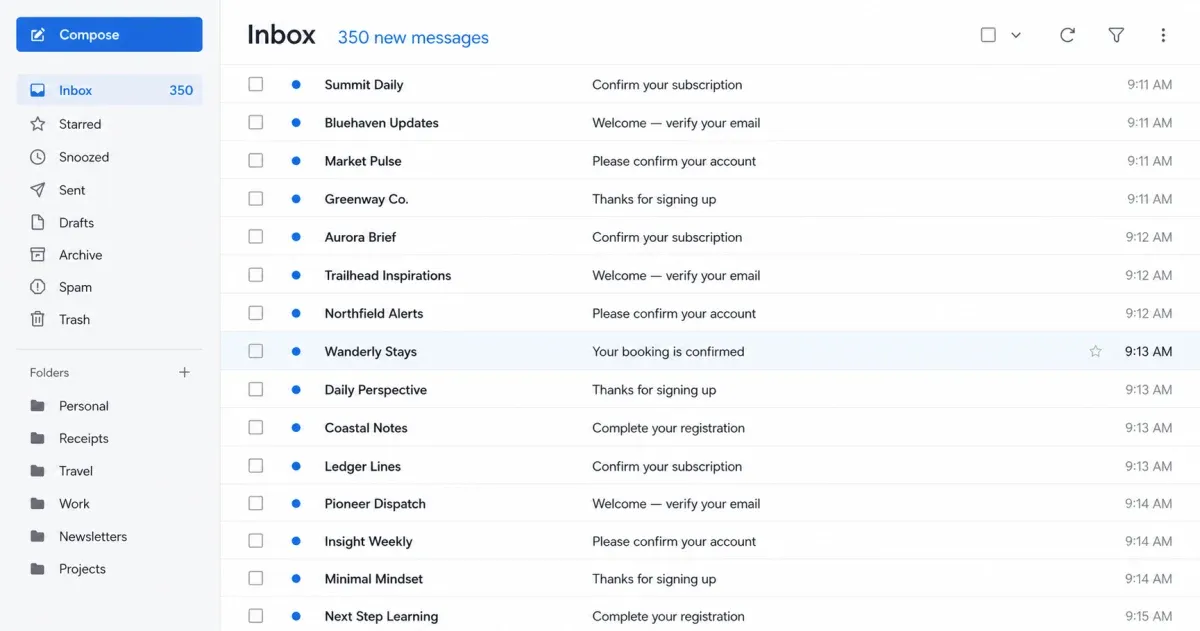
I’ve been hit by a couple of email bomb attacks recently. The first sign wasn’t one suspicious message. It was hundreds of perfectly ordinary signup emails arriving almost at once.
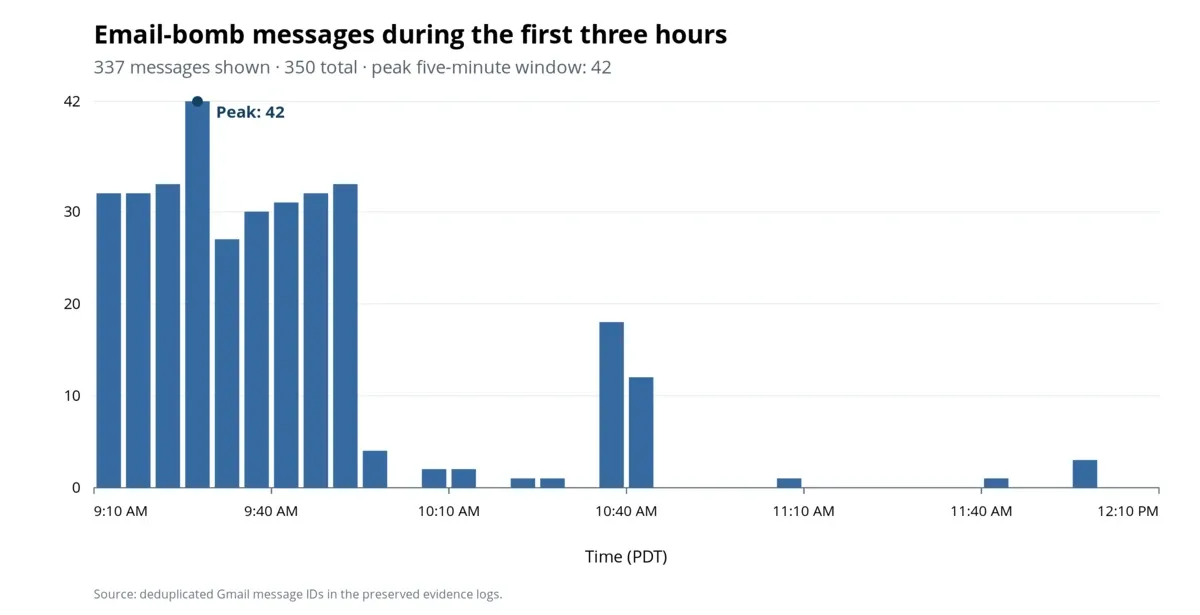
The August 2 attack produced 350 unique messages. Of those, 204 arrived in the first 30 minutes, and the flood peaked at 42 messages in five minutes. A few stragglers continued through 10:35 p.m. They came from unrelated websites, in multiple languages, for services I had never used.
Buried in the middle was the email that actually mattered: a confirmed, paid flight booking for a passenger I didn’t know, through a travel service I had never used.
That is the point of an email bomb. The junk is not necessarily the attack’s final goal. It is cover.
What the attacks were hiding
The important message in the August 2 attack was that Kiwi.com booking. Its payment confirmation arrived in Spam at 9:08 a.m. The email bomb began about three minutes later, and the final booking confirmation landed among the first wave.
The $442.85 booking was for someone else, used contact information that wasn’t mine, and showed a flight I had never booked. It was marked confirmed and paid.
This does not mean Kiwi caused the email bomb. Its confirmation was simply the message buried inside it.
This wasn’t the first time. In an earlier email bomb, the message hidden in the noise was a Best Buy order I hadn’t placed. Best Buy canceled it less than a minute later, but the pattern was the same: the flood arrived alongside the message that mattered.
What an email bomb looks like
An email bomb, sometimes called a subscription bomb or list bomb, uses automated forms to subscribe one address to a large number of newsletters, stores, and online services. The resulting messages may all be legitimate. You just didn’t request any of them.
Microsoft’s 2025 Digital Defense Report describes attackers using email bombs to hide password resets, fraud alerts, transactions, and other critical messages. The flood may also precede a fake support call. If someone offers to “fix” your inbox by taking remote control, do not let them in.
The flood alone does not prove that someone has accessed your email account. Anyone who knows your address can enter it into signup forms. It does mean you should stop treating the inbox as ordinary spam and start looking for whatever may be hidden inside it.
What I did
My first impulse was to report all the signup emails as spam and delete them. I stopped before doing that. Once there was evidence of possible fraud, preserving the timeline mattered more than having a tidy inbox.
1. Reconstruct the burst
I used Codex to search Gmail without changing any messages. I compared timestamps, senders, subjects, and categories, then reconstructed the burst from the individual message IDs.
If you are doing this manually, note when the flood began and search from that point. Do not rely only on Gmail’s Important label or whatever happens to be visible on the first page.
2. Search for the needle
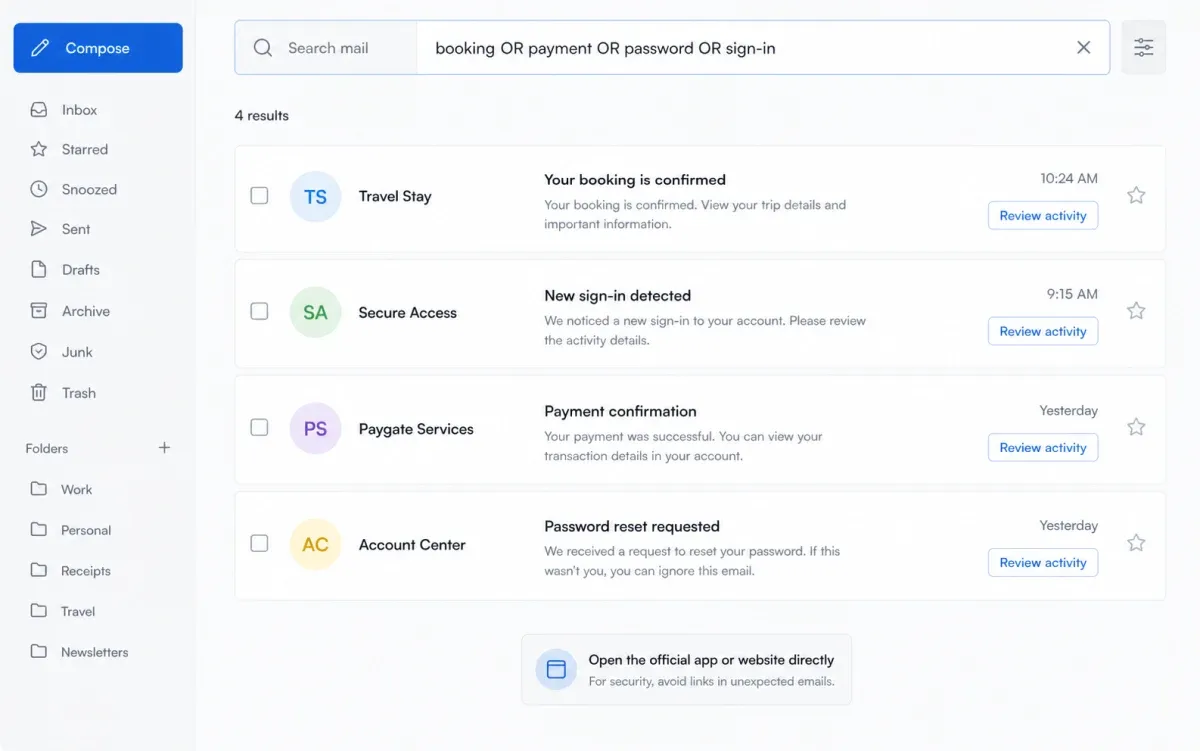
Instead of opening every newsletter, search for subjects that could represent the attacker’s real activity:
newer:2d (booking OR payment OR order OR transaction OR password OR "sign-in" OR verification OR security)Search Spam and Trash too. Useful terms vary, but I would also check for invoice, receipt, transfer, withdrawal, support, and the names of banks or stores I use.
3. Preserve evidence before cleanup
I saved the timeline, key emails, screenshots, and attachments in a dated security folder before changing anything.
If you later need help from a bank, merchant, email provider, or law enforcement, a clean timeline is more useful than a story reconstructed after hundreds of messages have been deleted.
4. Verify outside the email
Do not use links in unexpected messages to investigate. Open the company’s official app, type its address yourself, or use a trusted bookmark. Check bank and card activity directly and contact the fraud department if you find an unauthorized charge.
For the email account itself, review recent security events, signed-in devices, recovery information, third-party access, forwarding, delegation, filters, and sent mail. Google’s compromised-account guide covers those settings and recommends two-step verification. If you find unfamiliar access, change the password and sign out unknown sessions immediately.
An email bomb does not automatically mean your password was stolen, but it is a terrible time to assume everything else is fine.
5. Clean up slowly
After preserving the evidence, I moved all 350 identified bomb messages to Trash, reporting them as spam where appropriate. I protected booking, payment, security, support, and personal messages, avoided unfamiliar unsubscribe links, and watched for late arrivals for the rest of the day. Nothing was permanently deleted.
The end result
The mailbox recovered. I found the booking the flood could easily have hidden, preserved the evidence, and removed 350 bomb messages while protecting the messages that mattered.
The fraud investigation did not end as neatly. I did not establish which payment method funded the booking, and the flood by itself did not prove that anyone had logged into my Gmail account. I would rather leave those questions honestly unresolved than turn suspicion into a confident explanation.
I still receive one or two unexpected signup emails on some days, though I don’t know whether they’re connected to the attacks or are ordinary spam.
If this happens to you, the short version is:
- Stop deleting. Record when the flood began and preserve the mailbox state.
- Search for what matters. Look for bookings, orders, payments, transfers, password resets, sign-ins, and security alerts.
- Verify independently. Open official apps and websites directly; check banks and cards outside the email.
- Secure the account. Review sessions and mail settings, then change credentials if you find unfamiliar access.
- Clean up last. Protect evidence and important messages, and never permanently delete in bulk while the incident is still unclear.
Do not let the inbox flood set your priorities for you. The attacker created the noise. Your job is to find the one message they hoped you would miss.